
🖥️ UI Client App
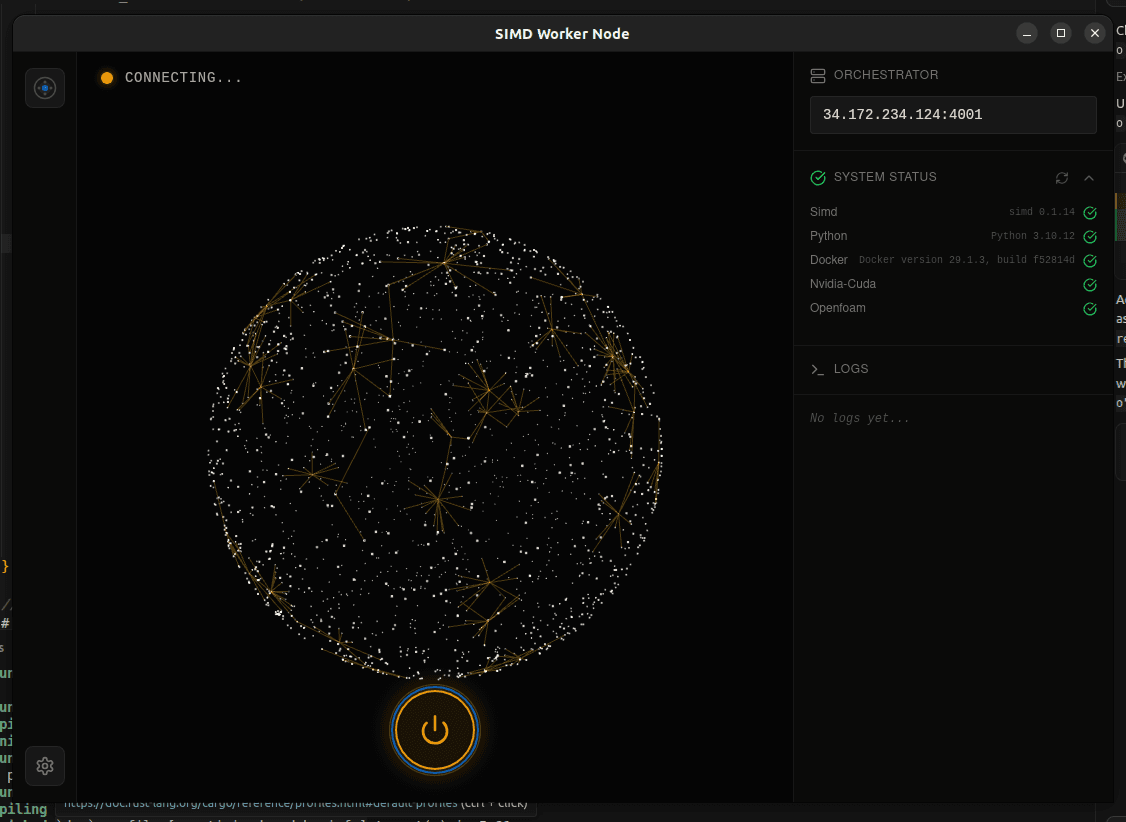
The SIMD UI Client provides a visual interface for running worker nodes on the network. It wraps the simd CLI in an intuitive desktop application.
Download & Install
Download the UI Client for Linux (Debian/Ubuntu):
After downloading, install with:
sudo dpkg -i SIMD-UI_0.1.15_amd64.debOverview
The UI Client is a desktop application designed for worker node operators who prefer a graphical interface over the command line. It provides real-time visualization of:
- Connection Status — Visual indicator showing connection to the orchestrator
- System Status — Real-time checks for SIMD, Python, Docker, NVIDIA-CUDA, and OpenFOAM
- Network Visualization — Interactive globe showing network activity
- Logs — Live log output from the worker process
Features
Orchestrator Connection
Enter the orchestrator address (e.g., 34.172.234.124:4001) and click the power button to connect. The status indicator will show:
- DISCONNECTED — Not connected to orchestrator
- CONNECTING — Establishing connection
- CONNECTED — Successfully connected and ready
- WAITING — Waiting for a job assignment
- WORKING — Currently executing a job
System Status
The system status panel shows the availability of required components:
- Simd — SIMD CLI version installed
- Python — Python runtime version
- Docker — Docker engine version
- Nvidia-Cuda — CUDA toolkit availability
- Openfoam — OpenFOAM simulation software
Live Logs
The logs panel displays real-time output from the worker node, including job assignments, execution progress, and any errors that occur.
💡 Note: The UI Client requires the simd CLI to be installed. See the Quick Start guide for installation instructions.